


Real Traffic Car Simulator 3D
4.418.00 Reviews
App Specs
- Version
- 1.1.0
- Updated On
- License
- Free
- Downloads
- 1,000,000+
- Developer
- Safari MMS
- Categories
- Racing
- Platform
- Android
Screenshots
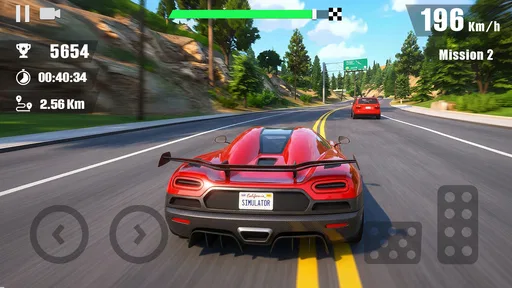
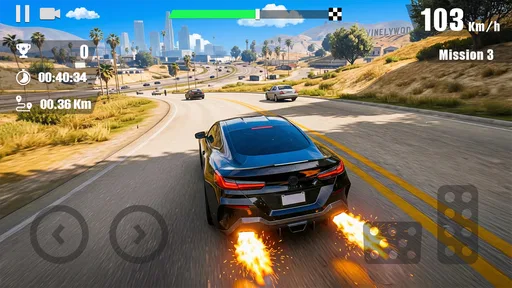
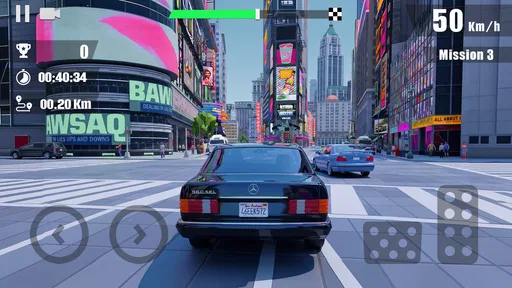
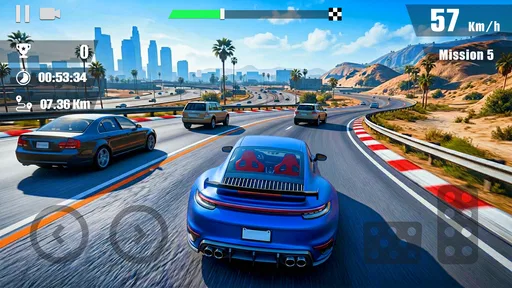
 Analysis by AppCompare
I approached Real Traffic Car Simulator 3D as a game for the small gaps in a day: the kind of racing experience I can pick up when I want quick highway pressure rather than a long campaign. Its appeal is easy to understand. You get behind the wheel, traffic becomes the main challenge, and the fun comes from staying alert while moving at speed. That simple premise can be satisfying, but it also means the game depends heavily on whether its driving feels good to you.
Made by Safari MMS, this free racing game is aimed at players who enjoy weaving through traffic more than carefully following a story or tuning a car for a lengthy career. It is rated for Everyone, and the current version is 1.1.0. The game has a 4.4 average from around a thousand ratings and has passed a million installs, so it has found an audience among people looking for accessible mobile driving. I’d still treat those figures as context, not a promise that every device or play style will feel the same.
Finding a comfortable driving rhythm
I like to begin by treating each drive as a chance to settle into the traffic, rather than trying to force a standout run immediately. That gives me a useful baseline for judging whether my choices feel deliberate and whether the controls suit the way I hold the phone. From there, I can make small, repeatable adjustments instead of changing my approach every time a run goes badly.
Start with short, deliberate runs
The most useful way to approach a traffic racer is to treat each run as a quick exercise in timing, not as a chance to hold the accelerator and hope. I’d begin with a short session and pay attention to how the car responds when traffic closes in. Leave yourself room to react, watch for gaps that remain open long enough to use, and resist making a last-second move just because a lane looks clear for a moment.
That sounds basic, but it changes the feel of play. If I focus on reading the road rather than chasing speed at every opportunity, mistakes become easier to understand. Was I moving too early, or did I commit to a gap that was already closing? That small bit of reflection gives a simple arcade-style drive more staying power, especially if you enjoy improving through repetition.
A practical everyday use is a few runs while waiting for a ride or taking a break between tasks. The game’s highway-racing focus suits short bursts better than a session that needs a long setup. I would not start a run when I have only a few seconds to spare, though: traffic driving rewards attention, and the experience is less enjoyable if you are repeatedly interrupted mid-maneuver.
Build one repeatable habit before chasing speed
Experienced players often get more out of a straightforward game by making their own routine. In this one, I’d pick a single habit to work on at a time: for example, keep a little extra space before changing lanes, or scan farther ahead instead of staring at the car directly in front. Repeating one adjustment makes it easier to tell whether it helps, rather than changing several things and guessing what made a run better.
Worth Reading Before You Choose

EA SPORTS FC Mobile 26 Is a Bigger Football Game, but It Takes Time

Flipboard Shows What News Apps Must Do Beyond the Feed

Switching to Android Auto Means Rethinking Your Driving Routine

Google Calendar Makes a Crowded Week Easier to Manage

Ludo King Makes the Most of the Minutes Between Plans

Baby Panda World Brings Quick Play to Modern Phones, but Its Game Library Feels Busy
Another useful habit is to end a run when concentration drops. Traffic racing can make a near miss feel like a reason to immediately try again, but tired reactions usually lead to more rushed decisions. A brief pause can be more productive than restarting on autopilot. This is a small tip, but it makes the game feel less like a frustrating cycle of collisions and more like a quick skill challenge.
Check the controls before settling in
Before trying to improve, I’d spend a moment getting comfortable with the available driving controls. The best choice is the one that lets you make a calm, predictable lane change on your own screen and device. I wouldn’t assume that the control style that feels natural in another racing game will suit this one; highway traffic asks for frequent small corrections, and awkward input can make a manageable gap feel stressful.
If the controls feel imprecise, try changing how you hold the device and how much attention you give to each movement before deciding the game is unfair. A relaxed grip and deliberate input can help with touch-based driving. The key is consistency: using the same approach across several attempts gives you a fairer sense of whether you are learning the traffic pattern or simply fighting your own control habits.
That consistency is particularly useful when you play in different places. On a crowded commute or in a waiting room, one-handed play may seem convenient, but it can make deliberate corrections harder and leave less room for the device to move safely in your hand. I’d save focused attempts for a seat where I can hold the phone steadily. If I’m standing or likely to be interrupted, I’d choose another moment rather than turn a quick game into an awkward balancing act.
Make settings serve the run
I recommend checking the game’s available settings before settling into repeated attempts, especially any options related to controls or presentation. Adjust only what you can clearly identify, then test it in a short run. This keeps the comparison useful: if you alter multiple options at once, it becomes difficult to know whether the change improved handling, visibility, or comfort.
Screen comfort matters more than it might seem in a game built around fast-moving road scenes. If the display feels visually busy or tiring, take a break and revisit the presentation options the game actually offers. I would avoid expecting a particular graphics toggle, steering mode, or camera adjustment unless you can see it in the menus. The practical rule is simple: use settings you can confirm, and judge them during play rather than relying on assumptions about what a mobile racer usually includes.
For a longer session, device comfort is part of the setup too. Hold the phone in a position that makes quick steering comfortable, and keep the screen unobstructed. If you are playing in a bright place, check that the road remains easy for you to read before starting a serious run. These are not special game features, but they can make the difference between responding to traffic and reacting only after a gap has disappeared.
I’d also avoid trying to judge a setting after only one unusually good or bad attempt. A lucky clear stretch can make an adjustment seem better than it is, while a single late reaction can make a comfortable control choice seem faulty. Keep the change consistent for a handful of ordinary runs, and compare how often you feel in control rather than focusing only on whether one run lasts longer. That is a more useful personal test than chasing an ideal configuration.
Use clean runs to learn, not just to score
One of the better ways to improve is to treat a run as a test. Keep your driving conservative for a while and notice how traffic behaves around you. Then, on a later attempt, take slightly tighter opportunities and see whether your timing holds up. This gives you a personal baseline without needing a complicated training mode: the road itself supplies enough decisions to practice observation and restraint.
When a run ends, remember the decision immediately before the mistake. If you moved into a lane without checking how quickly the next car was approaching, that is a more useful lesson than simply telling yourself to be faster. If you were already making good choices and the input still felt uncomfortable, the issue may be control comfort rather than judgment. Separating those possibilities helps avoid blaming the wrong thing.
I’d also avoid treating every open stretch as an invitation to take a risk. A calm sequence of safe choices can be more satisfying than a dramatic maneuver that ends the run. That trade-off is central to highway racing: pushing harder can make play exciting, but steadier driving gives you more time to read what is happening and decide what kind of challenge you want.
Turn brief play into a useful routine
A simple repeatable session can make the game easier to return to without making it feel like homework. I’d start with one cautious run to get my attention on the road, then use the next attempt to work on a specific choice, such as waiting for a more dependable opening. If I have time for another, I can try a slightly more assertive approach while keeping the same control setup. This progression gives each attempt a purpose and makes it easier to stop when I have had enough.
For example, if I open the game during a lunch break, I would avoid beginning with a personal challenge to beat a previous result. I’d first settle into the controls, then decide whether I want a calm run or a more demanding one. That small choice helps prevent impatience from taking over. It also makes the game a better fit for a short break: I can enjoy the focused driving without needing to set aside a long block of time or remember a complicated campaign objective.
Where its simplicity helps—and where it can wear thin
Compared with racing games built around long championships, licensed vehicles, elaborate tuning, or a story campaign, this is a more direct proposition. You come for the traffic and the pace, not for a broad motorsport package. That makes it easier to pick up, and it avoids asking you to invest in a lengthy progression before reaching the central driving challenge.
The trade-off is that players who need varied objectives may want more than a focused highway drive can provide. If you enjoy unlocking a deep garage, studying realistic race circuits, or competing through a structured season, a more feature-rich racer is likely a better match. I would choose this game when I want immediate traffic-dodging tension, not when I’m looking for a full simulation or a substantial career mode.
The comparison is also about the kind of attention a game asks for. A conventional track racer tends to make the circuit and braking points the lesson; a career-focused title gives you a longer progression to follow. Here, the appeal is repeated judgment in moving traffic. That narrow focus can be refreshing when I want to play without learning a large collection of systems, but it will not replace those alternatives for someone who wants varied events or a clear long-term goal.
The same distinction matters for realism. The word “simulator” in a game’s name should not lead you to expect a detailed driving-school tool. I’d approach it as mobile racing entertainment and judge it by the responsiveness and enjoyment of its driving, rather than by whether it teaches real-world road behavior. For actual driving practice, this is not a substitute for instruction or safe road experience.
Who should give it a try
Real Traffic Car Simulator 3D is a reasonable fit if you like quick racing sessions, enjoy judging gaps in moving traffic, and are happy to improve by repeating a straightforward challenge. It may also work for someone who wants a free game to sample before committing to a more demanding racer. Its Everyone content rating makes it broadly accessible, though younger players should still follow their household’s usual guidance about screen time and downloads.
I’d be more cautious if you dislike retry-based play, need a strong sense of progression, or find touch controls frustrating. Players who want a relaxing drive may also find traffic weaving too tense, since the core appeal depends on staying alert. And if your favorite part of racing is fine-tuning vehicle behavior or competing on closed tracks, the usual alternatives in those niches are more likely to satisfy you.
It is also a better match for someone comfortable with short, self-directed goals than for a player who wants the game to explain a detailed route through its content. If you like setting your own small target—stay patient, read farther ahead, or make fewer hurried decisions—the straightforward format leaves room for that. If you need missions, narrative milestones, or a steady stream of new objectives to hold your interest, I would look elsewhere rather than expect this traffic-focused loop to become something it is not.
For a first try, I’d recommend checking that your device runs Android 7.0 or later and then giving the controls a brief, low-pressure test. That is more useful than deciding from the game’s name whether it will feel like a simulator or an arcade racer. If the handling feels comfortable and you enjoy the concentration involved, there is a clear reason to keep playing; if the input or traffic pressure bothers you, no amount of persistence will make it the right style of game.
My verdict on getting better over time
For me, the best way to enjoy this game is to keep the routine simple: check the controls, make one settings adjustment at a time if needed, play a focused run, and notice one decision to improve on the next attempt. That approach makes the experience more deliberate without pretending there are hidden shortcuts or advanced systems waiting to be discovered. The useful “shortcut” is a better habit: look ahead, preserve room to react, and avoid changing lanes just because a momentary opening appears.
Safari MMS has made a free, approachable option for players who want highway traffic to be the main event. I like that the premise is easy to understand and that a short session can still give you something to work on. Its narrow focus is also its main limitation: once the traffic challenge stops feeling fresh, there may not be enough variety for players who expect a deeper racing package.
If that focused loop sounds appealing, I’d try it with modest expectations and give the controls a fair test on your own device. The game is most rewarding when I treat each attempt as a chance to make calmer choices, rather than demanding a full racing career from it. If you want that kind of quick, repeatable highway challenge, it is worth a look; if you want extensive modes and long-term progression, I’d choose a broader racing game instead.
Pros
- Offers a casual way to practice steering and parking in 3D.
- Multiple camera angles can make tight maneuvers easier to judge.
- Traffic adds variety to otherwise straightforward driving challenges.
- A useful pick for players who prefer relaxed simulation over racing.
- Short missions make it easy to play in brief sessions.
Cons
- Driving physics may feel less realistic than in dedicated simulators.
- Busy traffic can make some maneuvers frustrating.
- Visual detail may look dated on newer phones.
- Progress can feel repetitive after several similar driving tasks.
- Ads or in-app purchases may interrupt play
- depending on the version.
FAQs for Real Traffic Car Simulator 3D
What is Real Traffic Car Simulator 3D?
Real Traffic Car Simulator 3D is a driving game focused on navigating roads populated with other vehicles. Players can practice steering, manage their speed, and complete driving challenges in a simulated traffic environment. The exact selection of cars, locations, and activities may vary by version, so check the store listing and screenshots to confirm what is included in the download available for your device.
Is Real Traffic Car Simulator 3D suitable for beginners?
The game may suit newcomers who want a casual driving experience, since its core idea is to control a car and respond to traffic rather than learn real-world road rules in detail. Controls and difficulty can differ between versions, so beginners should try the available tutorial or settings first. Treat the game as entertainment, not as a substitute for professional driving instruction or a real driving simulator.
Does Real Traffic Car Simulator 3D work offline?
Offline availability depends on the version and on which features you want to use. Basic driving may be playable without a connection in some releases, while ads, online features, updates, or other content may require internet access. Before traveling or playing offline, install the game and test it with your device disconnected. Also review the current store description, as connectivity requirements can change after updates.
Is Real Traffic Car Simulator 3D free, and does it include ads or in-app purchases?
The game may be available to download at no upfront cost, but free mobile games can include advertising or optional purchases. The specific monetization model can vary by platform, region, and release, so check the Google Play or App Store listing before installing. If children will play, consider configuring purchase authentication and reviewing the device’s parental controls to help avoid accidental spending.
What should I check before downloading Real Traffic Car Simulator 3D?
Confirm that the app is offered for your device and operating-system version, and review its current storage requirements, permissions, age rating, and recent user feedback. Graphics performance and control responsiveness can vary across phones and tablets, particularly on older hardware. Download only from an official app store, and check the developer and listing details so you know which version you are installing.


